


Nolan Lambroza
Lumina Delay is the most creative delay I use. It’s my go-to delay. I love its versatility!

Tony Maserati
This is one of the most customizable delays I’ve ever used. The built in automation options allow for unique and attention grabbing effects contained within one plugin.

Austin Seltzer
Lumina Delay is the tool I’ve been missing and looking for for ages! Instead of the usual track duplication and meticulous copy-pasting for precise delay counts, panning, and filtering, Lumina lets you visually program the EXACT delay you want. It’s a game-changer, making life in music production (and, in my case, mixing) easier and faster. What more could you ask for in a plugin?

Ryan Schwabe
Lumina features a simple graphical user interface that allows effortless creation of delay taps. With its user-friendly interface, I was able to easily program vocal delays that sunk into my mix right away. This approach to a delay plugin GUI makes me wonder why this approach was not done earlier.

Steve Stout
Lumina Delay has such a refreshing user interface and is way more intuitive than the other options out there. I’m a big fan of classic tape echoes and this really captures the vibe of those units without the hassle. I love that everything is right there in front of you, not loads of menus to dig through or drop downs. I’ve been able to dial up super musical sounds super fast and have a fun time doing it!

Nash Overstreet
Lumina Delay is such a nice, easy way to create intricate delay patterns! I love the pan/eq controls being per-delay hit. Excited to use this on my upcoming records.

Calin Enache
Lumina is an incredibly useful creative tool with a very intuitive interface. Being able to dial in unique delays with this amount of control so quickly and easily is amazing. It’s fun to use and a real time saver.

Serge Courtois
I wanted to create a delay that thinks outside the box, beyond the limitations of conventional delays.
The Ultimate Delay For Creators
🎯 Perfectly place your delays into any mix
🤯 Craft dynamic fills and breaks
🌊 Create incredible depth in your tracks
🚀 Lock in your delay pattern in seconds
🔥 Add unmatched character to your music
🔊 Optimized for Stereo and 7.1.4
Lumina Delay - Audio Examples
Immersive Controls
With the release of version 2.0, we added the capability to create delay patterns in 3D spaces. Lumina Delay now supports Mono, Stereo, 5.1, 7.1.2, and 7.1.4 configurations.

Global Parameters
Global parameter controls give you the ability to finetune all your delay points at once.

Volume & Timing
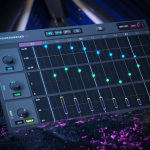
Create creative and intricate delay patterns with just a few clicks. Wherever you click on the grid a new delay will be created. Drag the point up or down to change the volume of that particular delay or drag it from left to right to adjust the timing.

Panning
Create completely new panning patterns. Whatever panning pattern you can think of, Lumina Delay can handle it. Drag a point up to pan the individual delay to the Left, and drag it down to pan it to the Right.

Hi | Low Pass
Lumina Delay visually shows you what frequencies you hear. Want to cut some more highs? Drag down the top of the rectangle. Want to cut more lows? Drag the bottom line up. See at a glance which frequencies you hear and which ones are being cut.

Wet | Dry
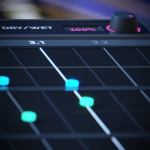
We included an easy to use Wet/Dry knob. By turning up the knob, the wet signal increases while the dry signal is simultaneously decreased.

Precision Mode
Need more precision? Holding down CMD/CTRL while moving a delay point gives you 10x the accuracy. Alternatively, right-click a delay point bringing up the delay point popup menu which gives you the option to type in the exact value.


🌟 Revolutionizing Delays 🌟
Lumina Delay is the world’s first fully parametric and immersive (7.1.4) delay, breaking free from the limitations of standard delays.
Instead of traditional knobs, Lumina Delay utilizes an intuitive click-and-drag functionality, allowing users to create delay points on a grid and effortlessly adjust parameters.
Featuring volume control, panning (now available in up to 7.1.4), HighPass, and LowPass filters, this plugin offers unmatched versatility.
Perfect for music producers, sound designers, and audio engineers, Lumina Delay has already been used on several notable tracks, including Tyla’s “Butterflies”, Eric Nam’s “House on a Hill” Deluxe version, and Alec Benjamin’s “I Sent My Therapist to Therapy” and “King Size Bed.”
Lumina Delay Roadmap

February 12, 2024 - v1.0.0
Lumina Delay Launch
March 14, 2024 - v1.1.1
1. Bug Fixes
2. Added Shortcuts:
Opt (Alt) + Scoll: Grid Resolution
Cmd (Ctrl) + Scroll: Zoom
3. Duplicating a delay point: Opt (Alt) + Click and drag
March 19, 2024 - v1.2.0
Added Glowing Delay Points
June 11, 2024 - v2.0.0
Full 7.1.4 compatibility for use in immersive environments
September 6, 2024 - V2.4.1
-Design Changes
-Improved UI for surround Channel configuration
September 30, 2024 - v2.5.0
Pitch FX
Lumina Delay
- Perpetual License
- Free Upgrades & Add-Ons
- Lifetime Access
Lumina + auxCord Bundle
- Perpetual License for auxCord (Plug-In + Standalone)
- Perpetual License for Lumina Delay
- Free Upgrades & Add-Ons
- Save 60%
Press Kit
→ Download Press Kit → Photo Pack
macOS Requirements
- macOS 10.13 and up
- VST3 or AU host or Pro Tools
- Apple Silicon or Intel
Plug-in Formats
Plug-in Formats (64-bit only)
VST 3, Audio Units (AU), AAX Native
Windows Requirements
- Win 10 64-bit and up
- VST 3 or Pro Tools
Made with passion.
I hope you enjoy using Lumina Delay and that it helps you take your next project to the next level.
As a Grammy award-winning audio engineer who has recorded and mixed multi-platinum records worldwide, I created this tool with you in mind.
-Serge


